5T71T09724 original Lenovo stylus



6844$
incl. Tax (19%)
plus shipping charges
plus shipping charges
5 pieces in stock.
- Standardlieferung 9. March - 10. March
- Expresslieferung 6. March
- bei Bestellung innerhalb 3 hrs 42 min




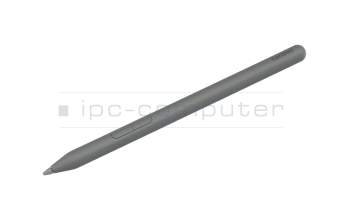
5T71Q51955 original Lenovo stylus
In stock
6380$
incl. Tax (19%)
plus shipping charges
plus shipping charges
Product Info
- Manufacturer
- Lenovo
- Item Number
- 5T71T09724
- Primary Partnummer
- 5T71T09724
- Safety information
- Sicherheits- & Herstellerkontakt-Informationen
The offered manufacturer number is an alternative (substitute) to the spare part number you are looking for.
Common data
- Condition
- New
- Color
- black
Technical Data
- Pen protocol
- AES 1.0 Wacom / AES 2.0 Wacom / MPP 2.0 / MPP 2.6 / USI 2.0 / WGP
- Weight (g)
- 11 g
- Length (cm)
- 14.8 cm
- Diameter (mm)
- 9 mm
- Number of buttons
- 2
- Pressure levels
- 4096
- Tilt function
- yes
- Power supply
- USB-C
- Operating system
- Windows 10 / Windows 11
Category
- Category
- Pens / Stylus
- Usage
- Laptop
- Excerpt of suitable models for P/N 5T71T09724
- Lenovo ThinkPad X1 2-in-1 Gen 10 (21NU/21NV) , Lenovo 10e ChromeBook Tablet (82AM) , Lenovo Tab P11 Plus (ZA9N) , Lenovo IdeaPad Duet 3 Chromebook 11Q727 (82T6) , Lenovo ThinkPad X12 Detachable Gen 2 (21LK/21LL) , Lenovo Yoga 7i 2-in-1 Gen 10 (83JT) , Lenovo Yoga 7i 2-in-1 Gen 10 (83JQ) , Lenovo Yoga 9i 2-in-1 Gen 10 (83LC) , Lenovo ThinkPad X1 2-in-1 G10 (21Q0/21Q1) , Lenovo ThinkPad T14s 2-in-1 Gen 1 (21R3/21R4)
You've found this article over a part number. We'll check if it's the correct sparepart for your machine. To do this, please insert the manufacturer and the name of the model in the order comment.
Videos & Contributions
How do styluses work and what should be considered?
Using a pen to operate the touchscreen is a convenient feature. But not every pen works with every notebook or tablet. You have to pay attention to these features.
Learn more >
Important and useful informations about laptop Pens
Frequently asked questions about Pens
- If your Stylus is using batteries, make sure you have inserted the right batteries in the right orientation and that they are fully charged.
- If this is the first time trying to use the stylus, you might have to remove a piece of insulation between the batteries and the contact. Usually this can just be pulled out from the side.
- If it is not using batteries, make sure the stylus is fully charged.
- If it is still not working, try restarting the device you are trying to use the stylus with or using it with another compatible device.
- If this should still not work contact us, or the manufacturer o the device.
